


Planning a trip should feel exciting, not complicated, and that’s precisely what Coast Radar Notes is all about. Whether you’re dreaming up your next seaside escape or journaling your latest coastal walk, Coast Radar helps you bring it all together in one interactive space.
It’s designed for travellers and everyday explorers who love organising trips, notes, and memories in a visual, hands-on way. Ready to give it a go? Let’s walk through how to create your first trip.
Step 1: Join our Community
To start creating notes and trips, you’ll need to log in. It’s quick, free, and gives you access to all the interactive features of Notes — from saving locations to building trip plans. Once you’re signed in, you can start adding notes, dropping map pins, and organising your next coastal adventure right away.
Step 2: Start with a Note
Every great adventure begins with a note.
On any Coast Radar listing, whether it’s a beach, cafe, castle or museum — click the floating “+” button to save and annotate it. Or, if you prefer, create your own note from scratch and drop a pin on the map.
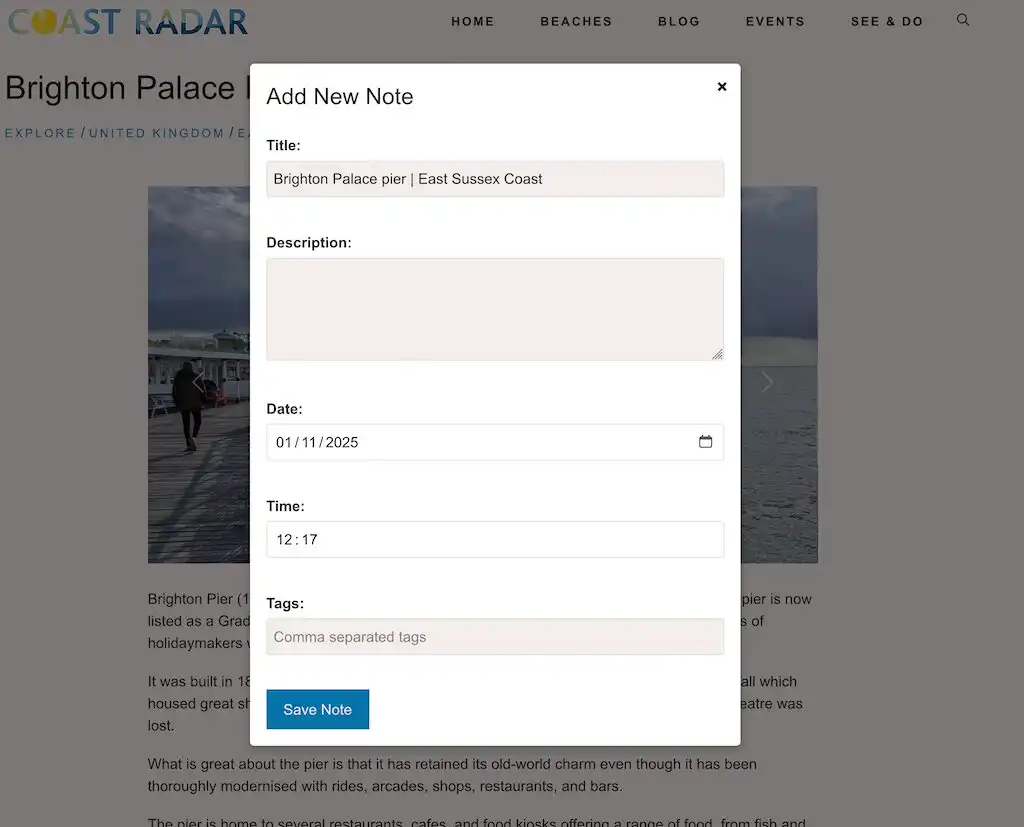
Each note can include:
- Title – give it a name like “Day 1 – St Ives and Beyond”
- Text note – jot down plans, ideas, or reflections
- Date and time – handy for organising your days
- Tag(s) – keep things tidy and searchable
- Website link – perfect for booking or referencing local spots
- Location – pin it right where the memory happens
The link and location are auto-populated from a listing page (see image above), but can later be edited or are available when creating a note from scratch.
Think of it as your travel journal, but smarter and more visually appealing.
Step 3: Use Tags to Stay Organised
Tags are your secret weapon.
They link everything together and keep your trips neatly organised. You might tag your notes with one or more tags, something broad like “Cornwall Summer“, or get more detailed with tags such as “Dog-Friendly“, “Beaches“, or “Sea Food Stops“.
Every note with the same tag can be filtered in the calendar and map views, and automatically groups into a trip. Simple, flexible, and effortless.
Step 4: Build Your Trip Timeline
Once you’ve tagged a few notes, Coast Radar’s Visual Trip Planner creates a timeline view with estimates of the distance between stops.
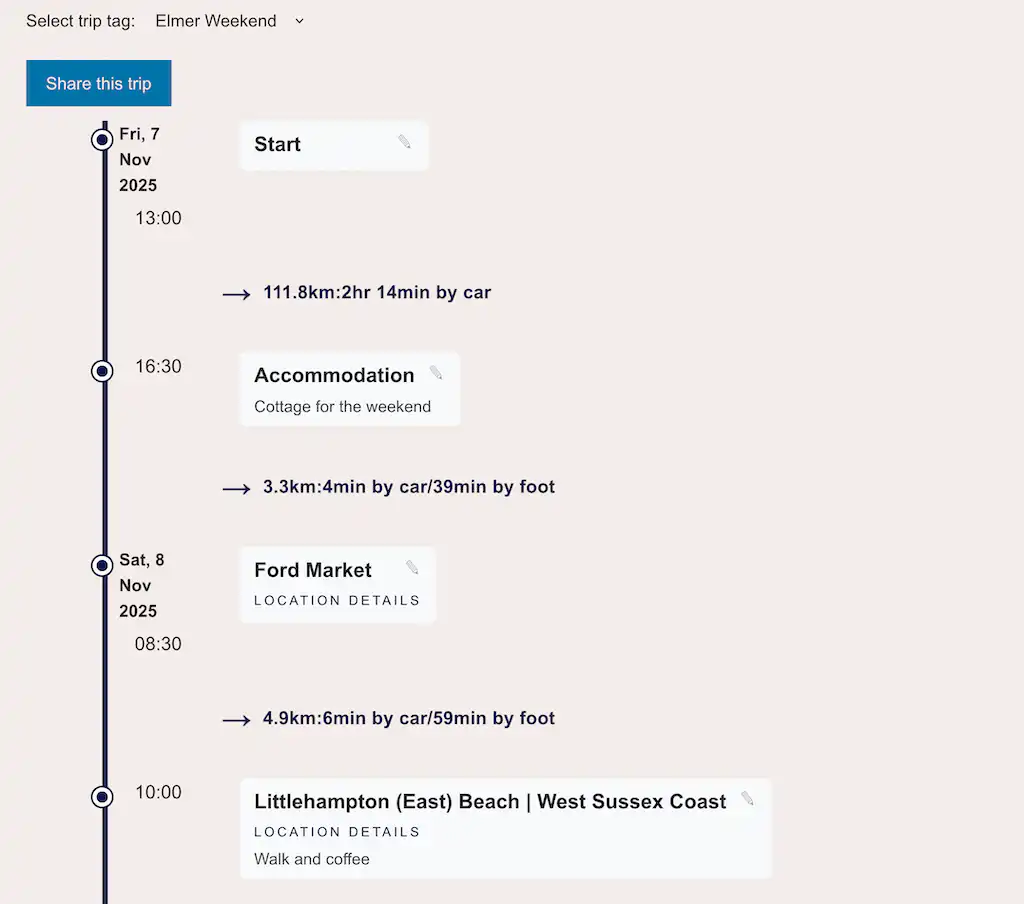
This is where your journey really starts to take shape. You’ll see your days unfold in order, with each stop, activity, and idea lined up. Rearrange, edit, or add new notes to fine-tune your trip.
It’s like watching your story unfold before it even begins. However, it doesn’t have to be just for planning. You can also use it as a journal, adding notes as you go to record your thoughts and reflections.
Step 5: Explore the Interactive Map
Hop over to the map view to see everything laid out geographically.

Your stops, routes, and highlights appear as pins you can click for details. Use the filters to view a specific trip or tag, and you’ll quickly see how your adventure connects from place to place.
It’s a brilliant way to visualise your trip and get a feel for what’s nearby.
Step 6: Switch to Calendar View
If you prefer to plan by date, the Calendar View is for you.
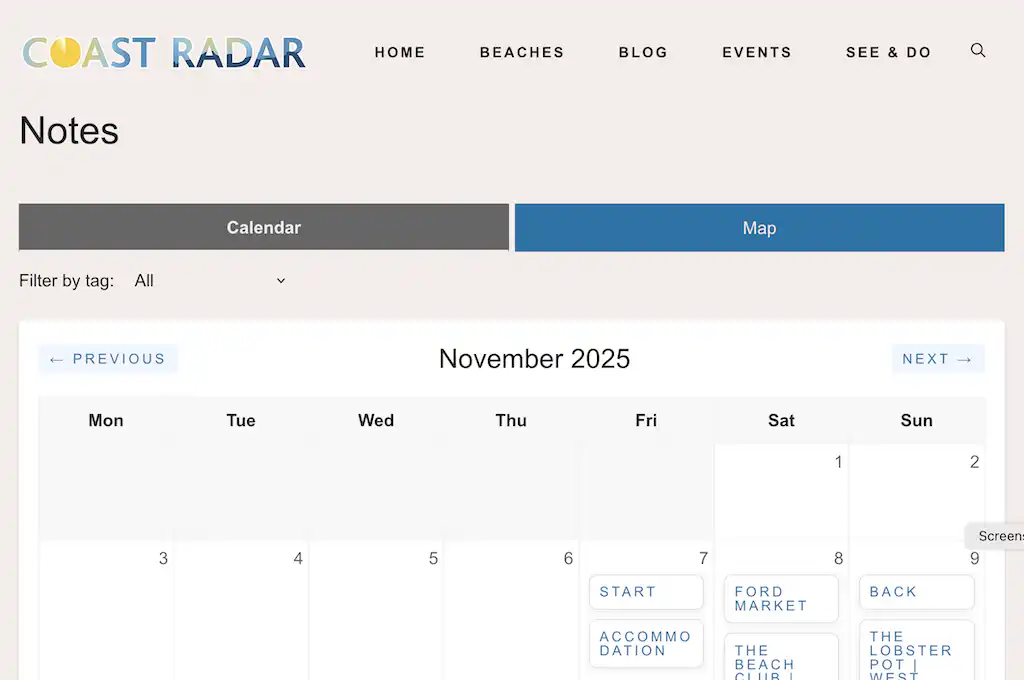
It arranges your notes by day, so you can clearly see what’s happening when. It’s also perfect for reviewing past trips — a little digital scrapbook you can revisit anytime.
Coast Radar can even email you your day, week or month ahead.
Step 7: Check Your Personal Dashboard
Your dashboard displays a tag overview and lets you update your email preferences.
Here you can also delete all your notes or notes within a single tag.
Step 8: Share Your Trip
When your trip’s ready to share, Coast Radar Trip Planner makes it effortless.
You can generate a secure, private link to send to friends, family, or travel buddies. They’ll be able to view your trip’s timeline and map — no login needed. You stay in control nothing is public unless you choose to share, and the share link will expire in 7 days.
Why You’ll Love It
Coast Radar Notes transforms your travel ideas into something you can see, organise, and share. It’s more than just a planner; it’s your personal space for building adventures and keeping memories alive.
So, why not start today? Create a free community account, click that little “+”, drop your first pin, and start crafting your next great coastal escape.